Attention! Dec. 13, the new GPSR rules go into effect!
The General Product Safety Regulation (GPSR) sets certain requirements for Amazon products to ensure consumer safety. As of Dec. 13, 2024, most non-food product detail pages must include warning and safety information to comply with the GPSR.
To comply with these regulations, there are three main attributes to be submitted per marketplace and per ASIN in the local language (DE/FR/NL/BE/IT/ES/PL/SE), with the exception of the UK.
Compliance at the brand level
- (1) Responsible person: Include the name/company name, address and e-mail address of the responsible person (often the owner). Phone number is optional.
- (2) Manufacturer: List the manufacturer's company name, address and e-mail address. Phone number is optional
Compliance at the product level
Provide images or documents that show necessary warnings and safety information
- (3) Upload documents: Individual documents can be uploaded via product listings or the Accounts Health Dashboard. Bulk uploads are possible via listing templates.
- (3) Upload images: Individual images can be uploaded via Image Manager in a ZIP file by ASIN (PS01-06 variants). Bulk uploads are possible via templates, which must first be generated
*Exceptions: Indicate whether the product is a food item or does not require safety warnings. This can be done by checking the box "Check 'yes'..." check the box on the relevant page in Seller Central
Documentation
These documents can be uploaded to comply with the GPSR:
- User Guide
- User's Guide
- User Manual
- Patient information sheet
- Provider information sheet
- Installation Manual
- Safety Information
Important points of interest
- The file name/title of the document must exactly match the option in Amazon's drop-down menu. Otherwise, the document will be rejected
- PDFs and links in the documentation must be accessible via a public URL
- A single image is sufficient if the warnings appear only on one side of the product packaging
How can I submit the required information?
Now that you better understand the new regulations, we'll explain step by step how to navigate to the right screen and where to enter all the necessary data.
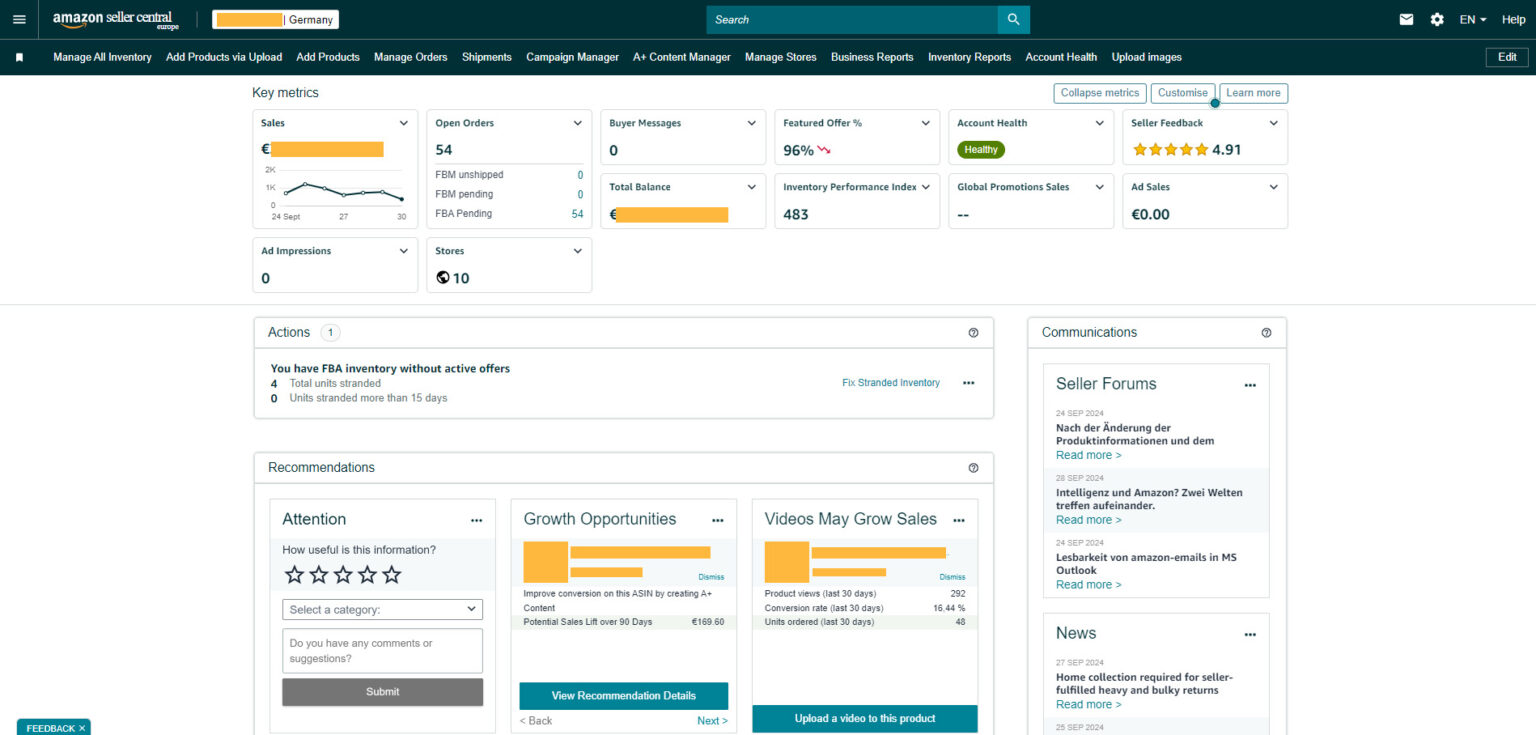
Step 1 - Go to the Account Status - Compliance page.
- Open the Amazon Seller Central dashboard;
- Navigate to the hamburger menu in the upper left corner of Seller Central;
- In the menu, go to "Performance" and select "Account Health."
- Scroll down and click on "Manage your compliance" in the lower right corner;
- Select "Regulatory compliance."
The page that opens will display all GPSR-related problems. Review them, provide the required information and click the "Submit" button. Your submission will be reviewed by Amazon within 7 business days. Keep a close eye on it!
Step 2 - Go to the Account Status - Compliance page.
Upload up to 6 images of the product or packaging with the warning and safety information to Amazon. Make sure the information is provided in the official language(s) of the respective country. If the country has only one official language, a document or image in that language is sufficient. If the country has multiple official languages, make sure the document or image is available in all of them. You must do this separately for each Amazon store. Uploads are done using "Country-specific images." Upload the image in JPG format with the file name consisting of the ASIN code followed by '.PS01' through '.PS06'.
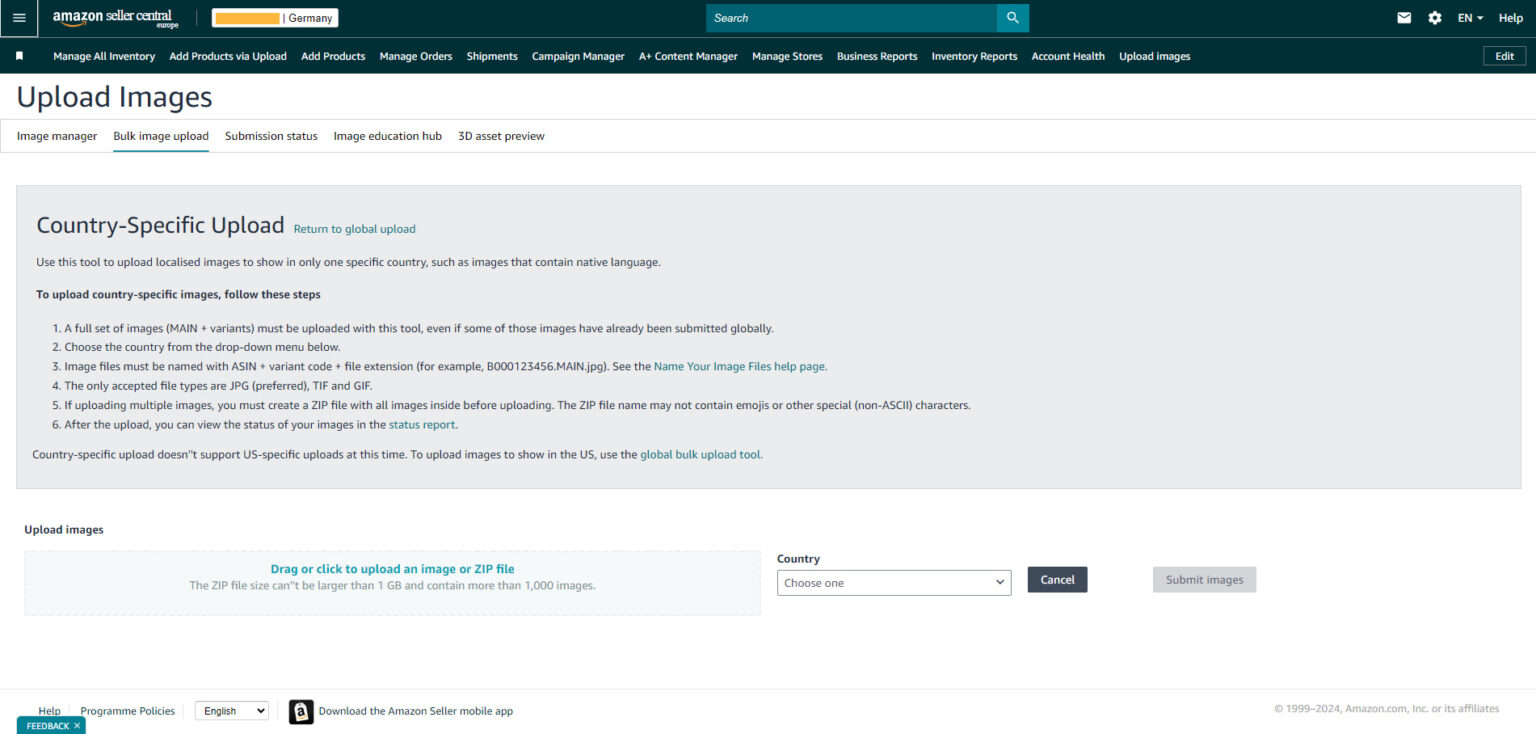
- Navigate to the hamburger menu in the upper left corner of Seller Central;
- Go to "Catalog;
- Select "Upload images."
- Choose a "country-specific upload" - it is important that images are delivered in the same language as the country of sale;
- Then select the image you saved;
- It may take up to 48 hours for images to appear on the product page. Please keep an eye on this!
Once the images or documents are successfully uploaded, they are displayed under the images section of the product page.
That was him!